
Are you still using JPEG or PNG in 2025 and think you are good to go?
Let me prove you wrong. There’s an image format called AVIF that outperforms all the others by 10 times — faster, smaller, and sharper!
What is AVIF?
Behind the strange abbreviation AVIF stands hides the term “AV1 Image File Format” which is modern and open-source image format.
It is developed by the Alliance for Open Media (AOMedia) — the same guys that made the AV1 video codec.
And they thought, “Hey, if we can make videos better, why not images too?”
AVIF stores high-quality images at much smaller file sizes than JPEG or PNG.
In many cases, an AVIF image is half the size of a JPEG while looking just as good — or better.
But it’s not just about size.
AVIF supports
- HDR (High Dynamic Range)
- 10-bit color depth
- wide color gamuts
- and transparency.
That means
- richer colors
- sharper details
- and better-looking images overall.
Basically, it’s like going from a flip phone camera to a DSLR — without slowing down your website.
And the best thing: Google, Netflix, and Mozilla are all on board. It’s not just a passing trend.
Benchmarks: AVIF vs. JPEG vs. WebP
Now you think does that really show in real world examples?
Let’s put some numbers behind these claims.
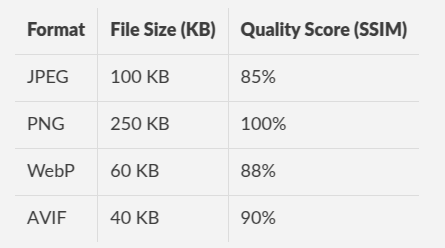
How AVIF Compression Works
AVIF is using the AV1 video codec to reduce file size.
Unlike JPEG, which has been around since the ’90s, AV1 is much more advanced and complex.
Instead of just removing details, AVIF uses prediction models and smarter compression methods.
In simple terms, AVIF can reduce an image’s size by 50% or more compared to JPEG without losing visible quality. That’s a big win for websites and apps.
Where AVIF Works
AVIF is already supported in most major browsers and platforms.
Browsers that support AVIF:
- Google Chrome (since version 85)
- Mozilla Firefox (since version 93)
- Microsoft Edge(since version 85)
- Safari(since macOS Ventura and iOS 16)
Software that supports AVIF:
- Adobe Photoshop
- GIMP (since version 2.10.22)
- ImageMagick (for bulk conversions)
- FFmpeg (for encoding and decoding AVIF images)
AVIF’s Cons
Of course, AVIF isn’t perfect. Here are a few things to keep in mind:
- Takes Longer to Encode— Creating an AVIF image takes more time than a JPEG. The extra compression comes at a cost.
- Not Supported Everywhere (Yet) — Some older systems and software don’t work with AVIF yet.
- More CPU Power Needed to Decode— Because AVIF compression is complex, it takes more processing power to open than JPEG. This isn’t a big deal for modern devices, but older phones might struggle a bit.
How to Start Using AVIF
Converting Images to AVIF
You don’t need to be a tech wizard to use AVIF. There are plenty of tools to convert your images easily:
- Squoosh.app— A free online tool by Google that converts images to AVIF.
- ImageMagick— A command-line tool for bulk conversion.
- XnConvert — A simple tool for Windows, Mac, and Linux.
Using AVIF on Websites
If you want to use it on yourwebsite, here’s how to do it:
1. Convert your images to AVIF using one of the tools above.
2. Use the <picture> element in your HTML to offer AVIF with a fallback option.
3. Test your site to make sure images load properly in different browsers.
Example code:
<picture>
 <source srcset="image.avif" type="image/avif">
 <source srcset="image.webp" type="image/webp">
 <img src="image.jpg" alt="A sample image">
</picture>
This way, AVIF loads where it’s supported, and other formats are used as backups.
The Future of AVIF
AVIF is quickly becoming the go-to format for web images. With big companies pushing for it and support growing, it’s only a matter of time before it replaces JPEG and PNG completely.
So if you care about website speed, SEO, and image quality switching to AVIF is the best choice.
So, what’s stopping you? Give AVIF a try and see the difference for yourself.
Leave a Reply